Dubbo3 多注册中心的小 Bug 线偶 发布于 2023-07-03 收录于 随笔1. 配置 1 2 3 4 5 6 7 8 9 10 11 12 13 14 15 dubbo: application: parameters: registry-type: service registries: a: address: nacos://172.16.1.104:7848 group: DUBBO_SERVICE_GROUP parameters: namespace: a b: address: nacos://172.16.1.104:7848 group: DUBBO_SERVICE_GROUP parameters: namespace: b2. 问题 只会注册到一个 namespace 中
Mybatis-Plus 自定义 Mapper 线偶 发布于 2023-06-08 收录于 随笔1. 问题 在真实的使用过程中,可能不同的 mapper 接口使用的 sqlSessionFactory 不一样。就比如下面这个例子。
安装 Harbor 线偶 发布于 2023-06-02 收录于 随笔1. 在 docker 上安装 harbor 1 2 3 4 5 6 7 8 9 10 11 12 13 14 15 16 17 18 19 20 21 22 23 24 25 26 27 28 29 30 31 32 33 34 35 36 37 38 39 40 41 42 43 44 45 46 47 48 49 50 51 52 53 54 55 56 57 58 59 60 61 62 63 64 65 66 67 # 下载harbor wget https://github.com/goharbor/harbor/releases/download/v2.8.1/harbor-offline-installer-v2.8.1.tgz # 生成CA秘钥 openssl genrsa -out ca.key 4096 # 生成CA证书 openssl req -x509 -new -nodes -sha512 -days 3650 \ -subj "/C=CN/ST=Beijing/L=Beijing/O=example/OU=Personal/CN=yourdomain.com" \ -key ca.key \ -out ca.crt # 生成秘钥 openssl genrsa -out yourdomain.com.key 4096 # 生成证书请求 openssl req -sha512 -new \ -subj "/C=CN/ST=Beijing/L=Beijing/O=example/OU=Personal/CN=yourdomain.com" \ -key yourdomain.com.key \ -out yourdomain.com.csr # 生成证书 cat > v3.ext <<-EOF authorityKeyIdentifier=keyid,issuer basicConstraints=CA:FALSE keyUsage = digitalSignature, nonRepudiation, keyEncipherment, dataEncipherment extendedKeyUsage = serverAuth subjectAltName = @alt_names [alt_names] DNS.1=yourdomain.com DNS.2=yourdomain DNS.3=hostname EOF openssl x509 -req -sha512 -days 3650 \ -extfile v3.ext \ -CA ca.crt -CAkey ca.key -CAcreateserial \ -in yourdomain.com.csr \ -out yourdomain.com.crt # 复制到harbor中, /data/cert/ 是harbor的证书目录 cp yourdomain.com.crt /data/cert/ cp yourdomain.com.key /data/cert/ # 转换为cert格式, 给docker使用 openssl x509 -inform PEM -in yourdomain.com.crt -out yourdomain.com.cert # 复制到docker中,这里是双向tls cp yourdomain.com.cert /etc/docker/certs.d/yourdomain.com/ cp yourdomain.com.key /etc/docker/certs.d/yourdomain.com/ cp ca.crt /etc/docker/certs.d/yourdomain.com/ # 重启docker,加载证书 systemctl restart docker # 执行harbor脚本,启动harbor ./prepare # 关闭 harbor docker-compose down -v # 启动 harbor docker-compose up -d # 验证docker docker login yourdomain.comharbor官方文档
Nacos 集群用 Nginx 代理问题 线偶 发布于 2023-06-01 收录于 随笔1. nacos 的端口 nacos 的 http 端口为 8848,但是 nacos2.0 之后使用 grpc 端口, 而且是偏移量计算的,所以使用 nginx 代理就有坑。
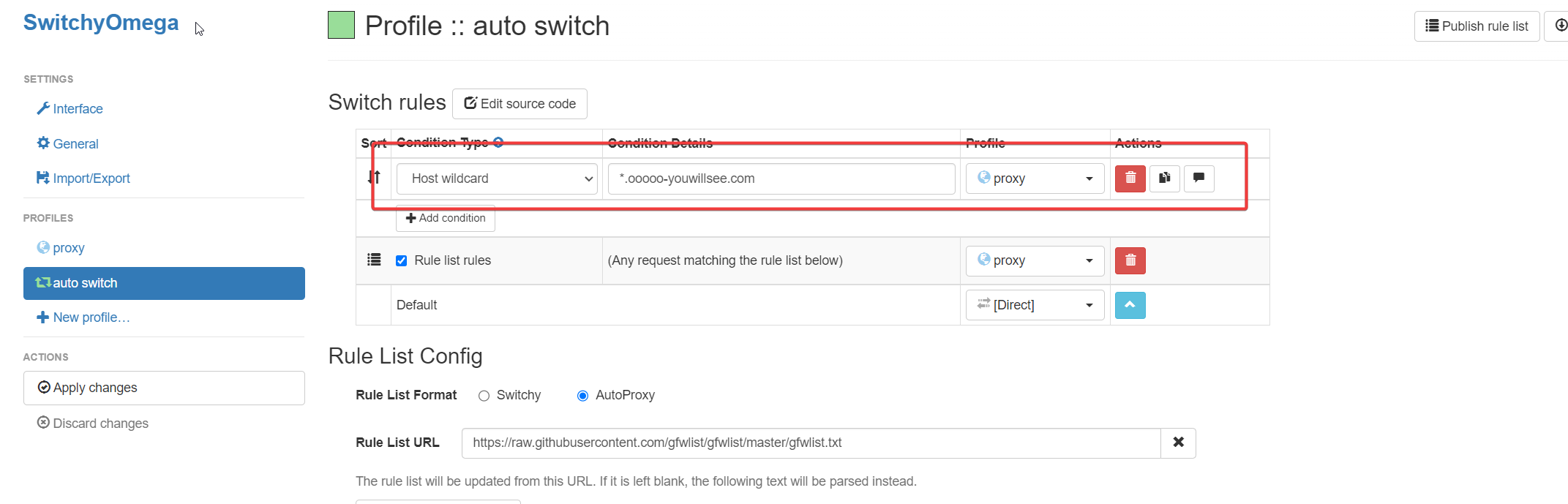
Github Page 图片无法访问 线偶 发布于 2023-05-27 收录于 随笔我在 chrome 安装了 SwitchyOmega 代理插件,导致资源加载有问题。检查 clash 代理,刷新 dns 配置,试试全局代理可以增加 SwitchyOmega 配置
Tcpdump 常用命令 线偶 发布于 2023-05-24 收录于 随笔-n 以数字显示 -X 显示包体 -i 指定网卡 -w 写入文件 -c 包的个数1. 指定端口 1 tcpdump -n -X -i any port 1234 -w 1.cap2. 指定主机 1 tcpdump -n -X -i any host 192.168.0.101 -w 1.cap3. 其他 1 2 3 4 5 6 7 8 # 监视指定主机和端口的数据包 tcpdump -i ens33 port 8080 and host node1 # 监视指定网络的数据包,如本机与192.168网段通信的数据包,"-c 10"表示只抓取10个包 tcpdump -i ens33 -c 10 net 192.168 # 抓取ping包 tcpdump -c 5 -nn -i eth0 icmp and src 192.168.100.623.参考 tcpdump说明